
Download NoteGuru – AI‑Powered Note‑Taking, Summarization & Study Tools
Overview
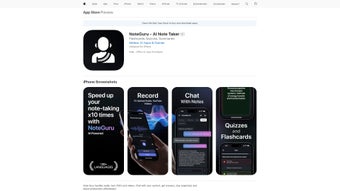
NoteGuru is a subscription‑based web application that brings cutting‑edge artificial intelligence to the everyday act of note‑taking. Whether you’re a college student trying to capture every nuance of a lecture, a professional recording minutes from a client meeting, or a researcher extracting key points from a lengthy PDF, NoteGuru streamlines the workflow by automatically transcribing audio, translating multiple languages, and generating concise, human‑readable summaries. The platform goes beyond simple transcription; it embeds interactive learning tools such as flashcards and quizzes, letting users test their retention immediately after a session.
An on‑demand AI assistant is also built into the interface, ready to clarify ambiguous points, expand on complex concepts, or re‑phrase a paragraph in simpler terms. By consolidating capture, summarization, translation, and study reinforcement into a single, secure cloud environment, NoteGuru saves time, reduces the mental load of manual note‑editing, and helps users transform raw information into actionable knowledge. The service continuously updates its language models and summarization algorithms, ensuring that each new release brings sharper accuracy and a smoother user experience.
For anyone who juggles multiple information sources daily, NoteGuru offers a reliable, secure, and future‑proof solution to keep ideas organized and readily accessible across devices.
Key Features & Capabilities
- AI‑Driven Transcription: Real‑time conversion of spoken words from meetings, lectures, podcasts, and videos into searchable text.
- Multilingual Support: Detects and transcribes over 30 languages, with instant translation options for global teams.
- Automatic Summarization: Generates concise, bullet‑point summaries that preserve core ideas while eliminating filler.
- Interactive Flashcards: Converts highlighted concepts into flashcards, complete with spaced‑repetition scheduling.
- Quiz Generator: Builds multiple‑choice or true/false quizzes directly from the summarized content to reinforce learning.
- AI Clarification Bot: Allows users to ask follow‑up questions about their notes and receive contextual explanations.
- Secure Cloud Storage: End‑to‑end encryption ensures that sensitive meeting minutes and academic notes stay private.
- Cross‑Device Sync: Seamless access from Windows, macOS, Android, and iOS browsers without additional installations.
- Version History & Export: Track changes over time and export notes in PDF, DOCX, or plain‑text formats.
- Regular Updates: Monthly AI model improvements and UI enhancements based on user feedback.
These features are not isolated; they work together to create a fluid workflow. For example, after a lecture is transcribed, the AI can instantly produce a summary, suggest flashcards for key terms, and generate a short quiz—all within a single session. The multilingual capability is especially valuable for international students or multinational corporations that need to capture discussions in different languages and then consolidate them into a unified English summary for broader distribution. The built‑in clarification bot reduces the need to switch between NoteGuru and external search engines, keeping the focus on the material at hand. Overall, the feature set positions NoteGuru as more than just a note‑taking app—it’s an all‑in‑one learning and productivity hub.
Installation, Usage & Compatibility
Getting Started – Simple, No‑Download Setup
Because NoteGuru is a web‑based solution, there is no traditional installation process. Users simply visit noteguru.com, create an account, and select a subscription tier that matches their needs. The onboarding wizard guides new users through creating their first note, linking a microphone for live transcription, or uploading an existing audio/video file. The interface is built with responsive design principles, ensuring that the layout adapts gracefully to desktop browsers, tablets, and smartphones.
Step‑by‑Step Usage Guide
- Create a New Project: Click “New Note” and give your project a descriptive title.
- Choose Input Method: Record directly through the browser, upload an audio/video file, or drag‑and‑drop a PDF.
- Set Language Preferences: Select the source language; the AI will auto‑detect if you’re unsure.
- Start Transcription: Press “Transcribe.” Within seconds, the raw text appears in the editor pane.
- Generate Summary: Click “Summarize” to receive a concise outline. You can adjust summary length with a slider.
- Engage Learning Tools: Convert highlighted sentences into flashcards or let the app auto‑create a quiz.
- Ask the AI: Use the chat box to request clarifications, definitions, or alternative phrasings.
- Save & Export: Choose “Save” to store the note in the cloud or “Export” to download in your preferred format.
Operating System Compatibility
NoteGuru runs on any modern web browser, making it compatible with Windows 10/11, macOS Ventura and later, Chrome OS, Android 9+ (via Chrome), and iOS 14+ (via Safari). Because the platform relies on cloud processing, performance is largely independent of local hardware—only a stable internet connection is required for real‑time transcription and AI summarization.
Security & Updates
All data transmitted between your device and NoteGuru’s servers is encrypted with TLS 1.3. User credentials are stored using salted bcrypt hashes, and the service complies with GDPR and CCPA standards. Updates to the AI engine are rolled out automatically on the server side, so users always benefit from the latest language models without manual patches.
Pros, Cons & Frequently Asked Questions
Pros
- Highly accurate AI transcription across multiple languages.
- One‑click summarization saves hours of manual editing.
- Integrated flashcards and quizzes turn notes into active study material.
- Secure cloud storage with end‑to‑end encryption.
- Responsive web app works on Windows, macOS, Android, and iOS without extra installs.
Cons
- Requires a stable internet connection; offline use is limited.
- Subscription pricing may be higher than basic note‑taking apps.
- Advanced AI features (e.g., custom summarization length) are locked behind higher‑tier plans.
- Large audio files (>2 hours) may experience longer processing times.
- No native desktop client for users who prefer a dedicated application.
FAQ – Your Most Common Queries Answered
Can NoteGuru transcribe in real time during a live meeting?
Yes. By granting microphone access in your browser, NoteGuru captures speech and displays a live transcript that can be edited on the fly. The AI also flags speaker changes and timestamps for easier navigation.
Is there a free trial or a free tier available?
NoteGuru offers a 14‑day free trial with full feature access. After the trial, users can choose between a Basic plan (limited summaries) or a Premium plan (unlimited AI tools).
How secure is my data when stored in the cloud?
All data is encrypted at rest and in transit using AES‑256 and TLS 1.3. NoteGuru complies with GDPR, CCPA, and ISO/IEC 27001 standards, ensuring that personal and corporate information remains confidential.
Can I export my notes to other formats?
Absolutely. Notes can be exported as PDF, Microsoft Word (DOCX), plain text (TXT), or even as CSV files for flashcard decks. Export options are available on the “Save & Export” page of each project.
Does NoteGuru work offline?
Core editing functions are accessible offline after an initial login, but AI‑driven transcription, translation, and summarization require an internet connection because processing occurs on the server.
Overall Rating: 4.5/5 – NoteGuru stands out for its AI accuracy and integrated study tools, making it a strong choice for students and professionals who need more than just a digital notebook.
Conclusion & Call to Action
In a world where information overload is the norm, NoteGuru offers a clear, AI‑enhanced path from raw data to actionable knowledge. Its ability to transcribe, translate, summarize, and transform notes into interactive study material—all within a secure, cloud‑first environment—makes it a compelling investment for anyone who values time efficiency and deep comprehension. While a subscription fee is required, the productivity gains, especially for frequent speakers, researchers, and learners, quickly offset the cost. If you’re ready to upgrade your note‑taking workflow, experience instant AI summarization, and turn passive listening into active learning, click the button below to start your free trial and discover why thousands of users already trust NoteGuru as their primary knowledge hub.
Start Your Free Trial Now


.png)



